Know which record you are reviewing
Date, reference and customer columns identify each entry. Member and walk-in activity can be reviewed in the module.

Give your lending company or cooperative one organised place to record, review and monitor GCash related cash in and cash out activity. Lendy PH keeps these internal records alongside your wider lending operation.
Internal transaction recording for Philippine lending teams. Lendy does not automatically access your GCash account.
The GCash module brings Members, Transactions and Reports into the same workspace. The transaction view below shows real fields for reviewing recorded activity, rather than a separate spreadsheet or a collection of payment screenshots.
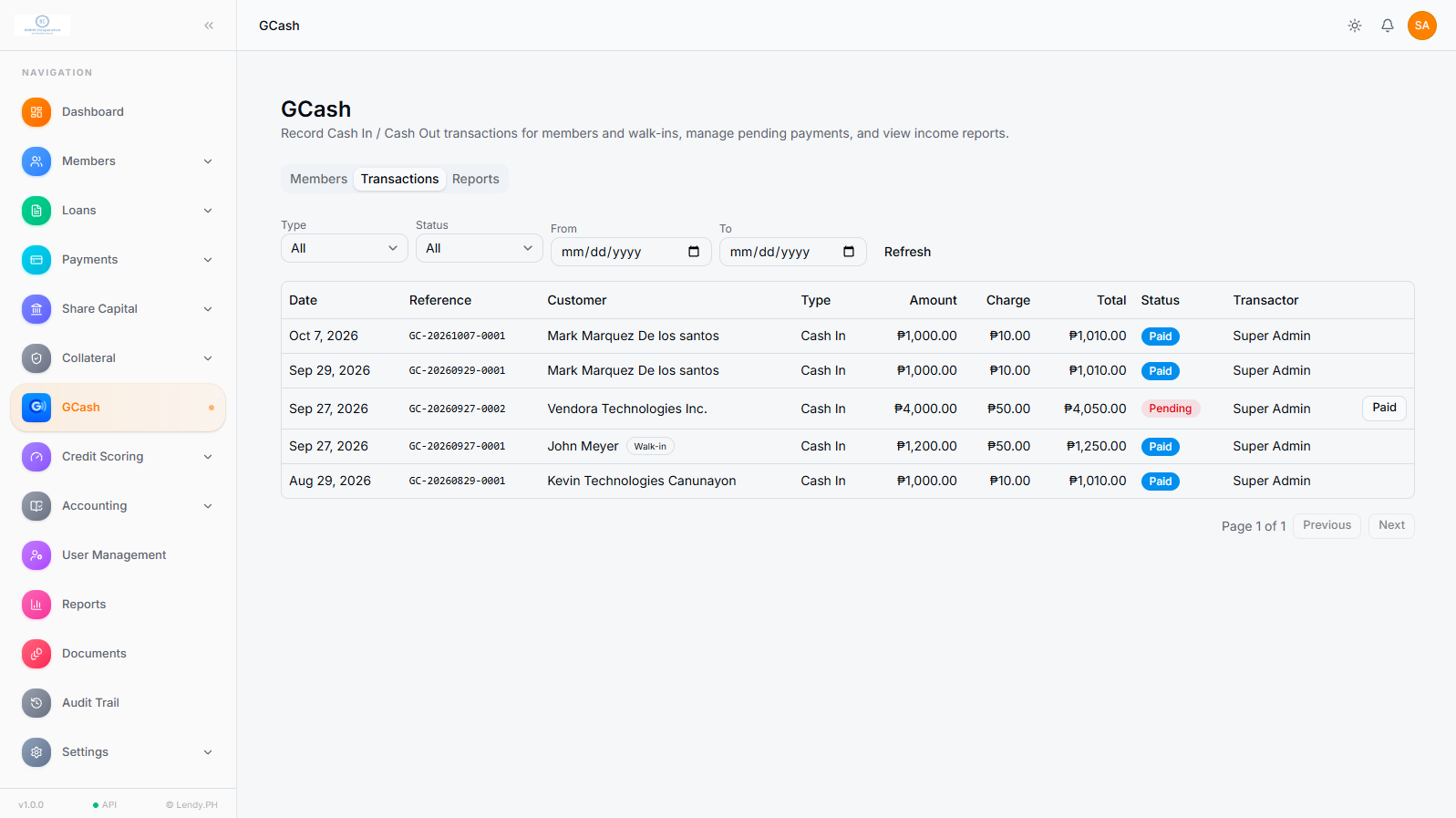
Date, reference and customer columns identify each entry. Member and walk-in activity can be reviewed in the module.
Amount, Charge and Total columns make the recorded values easy to distinguish, with a Transactor column for staff context.
Use the visible Type, Status, From and To filters, then Refresh the view for the period or records you need.
Paid and Pending labels help teams review outstanding records. A recorded status is not automatic confirmation of a GCash transfer.
A date in a notebook, a payment screenshot in a chat and a charge calculation in a spreadsheet can all describe the same transaction. Staff then have to bring those details together before they can explain it.
That extra checking can slow daily reviews, make older entries harder to trace and leave managers dependent on one person’s files. A well maintained spreadsheet can work, but it still needs clear ownership, consistent fields and a reliable review process.
Lendy provides a dedicated module for authorised users to record and review GCash related activity. Customer details, references, values and statuses stay in a structured transaction list.
Teams can return to the same entry during a review, instead of maintaining a completely separate manual tracking process. Your staff still compare records with the organisation’s own source information; this is record keeping, not an automatic connection to GCash.
Discuss your recording processRecord the details your team needs, preserve the values that applied at the time and make the next review easier.
Record GCash related cash in activity for members and walk-in customers. Keep the customer, reference, amount and applicable charge together so staff can return to the same record during a review.
Keep cash out activity identifiable by transaction type. Distinguishing cash in from cash out gives your team clearer context when checking activity against its own source records.
Use your organisation’s configured charge tiers to record applicable charges consistently. The transaction list separates amount, charge and total, making each part of the recorded value easier to review.
Preserve the amount and charge recorded at the time of a transaction. When your charge settings change, earlier records retain their historical values rather than being recalculated using the new settings.
Narrow the transaction list by type, payment status and a date range. Refresh the view to focus on the period or group of records you need to check, instead of reviewing every entry at once.
See whether an internal transaction record is marked Paid or Pending. The supplied interface also shows a Paid action for a pending entry. These are Lendy record statuses, not automatic confirmation from GCash.
Return to earlier entries using their dates and reference numbers. The dedicated Reports area supports review of GCash income activity, alongside the wider lending reports available in Lendy.
The Transactor column shows the staff account associated with an entry. Lendy also provides platform roles, permissions and an audit trail. Review the specific GCash audit events with our team during your demo.
Transaction charge tiers are configured for your organisation. This page does not publish or promise official GCash fees.
Use this recording and review process with your team’s own source information. The exact entry controls can be demonstrated in your Lendy walkthrough.
Confirm whether the activity is cash in or cash out, and whether it relates to a member or a walk-in customer.
Keep the date, customer, reference and amount with the entry so it can be checked against your source records.
Review the applicable configured charge tier and the amount, charge and total associated with the transaction.
Check Paid or Pending status using your internal confirmation process. Verify the underlying activity before updating a record.
Filter by type, status or date range to return to the entry during daily checks, historical reviews or reporting.
A change to your charge settings should not rewrite the explanation for an earlier transaction. Lendy preserves historical transaction values so staff can review the amount and charge recorded at that time.
Your team records a transaction using the charge structure that applies then. That entry becomes the reference for later review.
Management updates the charge tiers for future activity. The older transaction still shows the amount and charge recorded under the earlier structure.
When a treasurer asks about an older reference, your team can explain the record using its original values, rather than trying to reconstruct it from today’s settings.
The value is a more consistent source of information for cashiers, finance teams and management. Good transaction recording still depends on complete entries and regular checks.
Keep the details of a transaction together instead of relying on separate messages, screenshots and personal notes.
Use type, status and date filters to examine the relevant records before following up on a question.
Compare dates, references, amounts and charges against your own source records with more context.
Explain an earlier transaction using the values recorded then, even after charge settings have changed.
Maintain supported transaction information inside Lendy instead of copying it into another tracker.
Give authorised managers a shared view of recorded activity and the staff account associated with each entry.
For organisations that use GCash alongside their lending work and want a structured way to maintain internal transaction records.
For cashiers, collection officers and managers keeping transaction records alongside loans and repayments.
For treasurers and cooperative teams organising member transactions alongside lending services.
For teams reviewing member related activity, transaction charges and records from earlier periods.
For finance and operations teams that need clearer records across their lending processes.
For organisations whose daily work includes lending and GCash related transaction recording.
Lendy’s wider platform supports multiple branches and staff roles. Discuss your branch review and access needs in a demo.
Spreadsheets can be useful when they are maintained carefully. Lendy offers a shared operational workspace when your team needs these records alongside its lending work.
| Review need | Separate tracking files | Within Lendy |
|---|---|---|
| Finding a transaction | Details may sit across sheets, notes or messages. | Customer, date, reference and values are in a structured transaction list. |
| Checking earlier activity | Staff may need to locate previous files or versions. | Dated records remain available for authorised review. |
| Understanding old charges | Changing formulas or settings needs careful version control. | Earlier entries retain their original transaction values. |
| Sharing operational context | Management may rely on individual staff files. | Transaction records sit in the same platform as wider lending work. |
These examples describe internal recording and review. They do not involve automatic access to a customer’s or organisation’s GCash account.
An authorised cashier records cash in or cash out activity with its customer, reference and values. Staff have one entry to return to when a question comes up.
A manager filters the day’s records and checks amounts, charges, totals and Paid or Pending status against the organisation’s source information.
A treasurer reviews an older reference after the charge tiers have changed. The earlier record still shows the values that applied when it was recorded.
An operations team reviews GCash income activity and wider lending reports in Lendy, while keeping any required external reconciliation checks in its process.
GCash transaction recording is one capability within Lendy PH’s lending management platform. Your team can maintain more operational information in one workspace without treating each activity as a separate project.
Manage member and borrower records, loan applications, approvals and releases alongside the organisation’s other operational work.
Track payment schedules, recorded repayments and loan history. GCash recording and loan payment management are distinct capabilities; automatic transfer matching is not claimed.
Monitor dues and overdue accounts while keeping collection activity organised for your team.
Maintain member share capital, pledge credits and loan collateral within the cooperative’s wider lending records.
Review lending reports, configure roles and permissions, and use the platform audit trail. Discuss branch management and GCash review needs with our team.
Explore practical explanations of the connected workflows your staff and managers use each day.
Lendy PH provides lending management software. It does not lend money directly to borrowers, provide GCash financial services or claim official GCash partnership, accreditation or endorsement.
The GCash module helps your organisation record and review its own transaction activity. Your team remains responsible for confirming the underlying transaction and maintaining its internal review process.
GCash transaction management means recording, organising and reviewing GCash related activity, including transaction type, date, customer, reference, amount, charge and payment status. In Lendy PH, these are internal operational records within a lending management software platform.
Yes. Lendy supports cash in and cash out transaction recording for members and walk-in customers. Staff can review these records in the GCash module and use the type filter to focus on the relevant activity.
Lendy supports configured transaction charge tiers and records the applicable charge with the transaction. The list displays the amount, charge and total separately. These are your organisation’s configured charges; they are not a published schedule of official GCash fees.
Earlier transactions keep the values recorded at the time, including their original amount and charge. Changing charge settings later does not make those historical records appear as if the new settings applied to the earlier transaction.
Yes. The transaction list contains dated records with reference numbers, customers, amounts, charges, totals, statuses and transactors. Type, status and date range filters help authorised staff focus their review.
Yes. Lendy PH is software for Philippine lending companies, financing businesses and other organisations that manage lending operations. The GCash module keeps related transaction records inside the same platform as the organisation’s lending work.
Yes. Credit cooperatives and multipurpose cooperatives can record GCash related activity alongside their member and loan operations. The module supports records for members and walk-in customers.
No automatic GCash account connection is included in the transaction recording capability described here. Staff record and review activity in Lendy, then compare it with the organisation’s own GCash records. Lendy does not automatically access the account or confirm a GCash transfer.
Lendy PH does not claim an official GCash partnership, affiliation, accreditation or endorsement. The GCash module is part of Lendy’s internal record keeping software, not an official GCash product or a service for carrying out GCash transfers.
No. Lendy PH provides lending management software to organisations that manage loans. Lendy PH does not lend money directly to borrowers or provide GCash financial services.
Lendy can serve as the structured place for the transaction records supported by its GCash module. Compare your spreadsheet fields, review process and reporting needs during a demo to decide which manual trackers it can replace.
Lendy supports staff accounts, roles and permissions. Authorised team members can work within the platform according to the access assigned to them, and the transaction list shows the transactor associated with each entry.
Yes. The GCash module includes a Reports area for reviewing income activity. Lendy also provides wider lending reports. Ask for a walkthrough of the available GCash report fields and your review requirements during a demo.
Lendy includes a platform audit trail, roles and permissions. The GCash transaction list also displays a Transactor column. Ask our team to demonstrate the specific GCash actions captured in the audit trail so you can check them against your organisation’s review process.
Yes. Lendy includes lending workflows and a GCash transaction recording module in the same platform. This brings more of your operational records into one workspace; it does not imply automatic matching of GCash transfers to loan payments.
If your organisation uses GCash alongside its lending work, explore a clearer way to maintain transaction records together with members, loans, collections and reports.
Bring your recording, charge and reporting requirements to the walkthrough.