Review application status
Summary cards show Total Applications, For Approval, Active Loans and Rejected. Tabs separate stages including Draft, Released, Current, Past Due and Completed.

Manage borrowers, applications, approvals, loan releases, repayments and collections in one cloud based workspace. Lendy PH gives lending companies and cooperatives a clearer way to follow the full loan cycle and oversee daily work.
Lendy provides software to organisations managing their own lending operations. Lendy PH does not lend money directly to borrowers.
A lending management system is software for organising lending activity from borrower or member registration and loan application through approval, release, repayment, collection and completion.
It gives authorised staff a structured place to maintain related records and carry out their part of the lending process. A borrower profile, an application, an approval and a payment schedule describe different stages of the same relationship; keeping them connected makes that relationship easier to understand.
The system also helps management review activity through reports and apply operational controls through permissions and recorded history. It supports the organisation’s lending process, while people remain responsible for assessment, decisions and checking records.
A spreadsheet can be a useful starting point. As more borrowers, staff and branches become involved, separate files need more coordination: one file for applications, another for schedules, a chat for decisions and a manual summary for management.
When these sources do not stay in step, a simple question about a loan can turn into repeated checking and encoding. Staff may need to find the latest approval, confirm a payment or ask the person who owns a particular file.
Lendy PH is cloud based lending management software for organisations operating in the Philippines. It brings registration, applications, approvals, releases, schedules, payments, collection monitoring, restructuring and completion into a shared workflow.
Cooperative share capital, collateral, GCash transaction records, reports, staff permissions and branch configuration support the wider operation. Teams can return to the relevant person or loan instead of rebuilding its history from separate trackers.
This is a structured working environment, with configuration for your organisation’s products and responsibilities. It does not replace your lending policy or automatically make credit decisions.
Follow the process from start to finishThis is the supplied Loan Management screen inside Lendy, showing application summaries, status tabs and a searchable loan list. It is a real product view, with the records shown at the time the screenshot was taken.
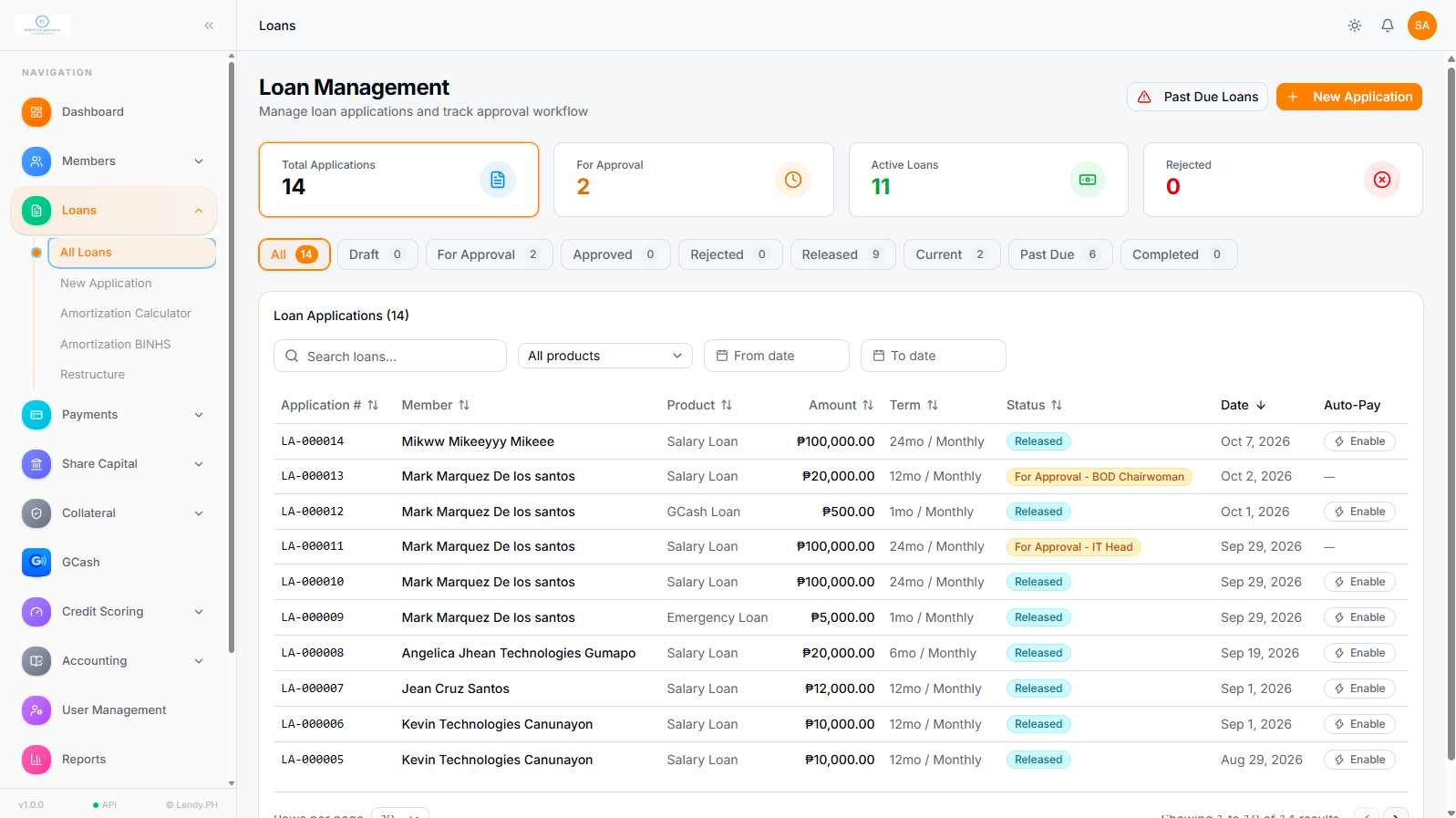
Summary cards show Total Applications, For Approval, Active Loans and Rejected. Tabs separate stages including Draft, Released, Current, Past Due and Completed.
Search loans, filter by product and set From and To dates. The table shows the application reference, member, product, amount, term, status and date.
The supplied records include approval statuses naming the review stage. That status provides context about where an application is in the configured process.
New Application and Past Due Loans controls are visible, along with amortisation and restructuring navigation. Detailed controls can be explored during a demo.
Each stage has a different job, but its information belongs to the same lending history. Open a step to see what the team records or reviews. The organisation’s policies guide the decisions throughout.
Maintain a profile with personal details, contact information, identification and supporting documents. Related loans stay connected to the borrower or member so staff can review the person’s lending history before starting another application.
Create an application linked to the borrower using the organisation’s configured loan products. Keep the requested amount, term, applicable fees and supporting information with the application rather than in separate messages or files.
Staff review the available borrower, loan and application information against the organisation’s own policies. Lendy organises the information for that review; this does not mean automatic underwriting or an automatic lending decision.
Applications move through defined approval stages with responsibilities assigned through user access. The supplied loan list shows stage specific statuses, helping staff see where an application is waiting. Your organisation remains responsible for its decisions.
Maintain release information alongside the borrower and loan record. Distinguish an application awaiting approval from a released loan so staff have a clear starting point for repayment monitoring. Recording a release does not itself transfer money.
Keep the amortisation schedule associated with the loan and its agreed terms. Staff can use scheduled dues as the reference for reviewing repayments, upcoming obligations and the progress of an active loan.
Authorised staff record payments against the correct loan and maintain payment history and outstanding balances. Checking the source payment and the loan reference remains part of your team’s internal process; a software record is not proof of an external transfer.
Use available schedules, due and past due information and recorded payments to decide which accounts need attention. Collection teams work from the borrower’s records and management can review activity through reports. Lendy does not collect money automatically.
When an authorised change is needed, use the supported loan restructuring process and keep the revised arrangement connected to the lending record. Review the available controls and the treatment of schedules and balances in a demo for your specific use case.
Review the loan’s recorded payments and completion status according to your process. Completed loan information remains part of the borrower’s history, giving staff context when answering a later question or reviewing a new application.
Bring one of your loan products and follow it through these stages with our team.
See the Workflow in a DemoA borrower profile gives staff a common starting point. Personal and contact details, identification, supporting documents and related loan activity provide context for applications, payment questions and collection follow up.
When someone asks about a previous loan, the team can review related records instead of searching for a standalone file. Keeping information up to date and assigning appropriate access remain part of daily record management.
Explore cooperative member and loan managementApplications need enough context for review, and approvals need clear responsibilities. Lendy keeps these stages within the lending workflow while allowing the organisation to configure its own approach.
Connect the application to the borrower, loan product, amount, term, applicable fees and supporting information. Staff can review the current status and the relevant details together instead of piecing them together from email or chat.
Configured loan products and reusable fees help keep the information consistent with your organisation’s process.
Configure approval stages and access for the people responsible for each review. A cooperative committee and a lending company may use different stages; the system provides structure without assuming their policies are identical.
Staff can see where an application is waiting. Relevant recorded system actions support later review through the audit trail.
Assessment and approval remain the organisation’s responsibility. This page does not describe automated underwriting or automatic loan approval.
A released loan needs an understandable schedule and reliable payment records. These provide the context for borrower questions, outstanding balances and accounts requiring attention.
Maintain the approved loan’s release details with its record. The release marks a stage in the lending lifecycle, while the connected borrower and loan information provide the reference for repayment monitoring.
Recording release details in Lendy is separate from the organisation’s actual disbursement of funds.
Use amortisation schedules to review expected dates and amounts due. Recorded repayments and outstanding balances help staff explain what has been paid and what remains, with the loan’s history available for later questions.
Explore loan and payment managementReview upcoming dues, due and past due accounts alongside recorded payments. Collection officers can identify accounts needing follow up, and managers can review the supporting reports without rebuilding a collection list from several files.
Explore loan collection managementLendy supports loan restructuring within its lending workflow. Keeping an authorised revised arrangement connected to the loan helps staff understand the account as it changes instead of treating it as an unrelated record.
Demonstrate your proposed restructuring case to review the available controls and the treatment of schedules and balances.
For a cooperative, understanding a member’s lending relationship may involve more than the loan alone. Related capital and collateral records provide additional operational context.
Maintain share capital records, subsidiary ledgers, pledge entries and automatic credits. Keeping this information near member lending activity gives treasurers and staff a clearer reference during review.
Record collateral details and link them to the appropriate member and loan account. Configure collateral types to support the organisation’s recording process and make the relevant information easier to find.
Lendy’s GCash module records cash in and cash out activity, applicable configured charges and historical transaction values. Staff can review the recorded date, reference, customer, amount, charge, status and transactor using the module’s filters.
Keeping these internal records in the lending platform gives the organisation another structured source for operational review. Earlier entries preserve their original values when charge settings change.
Explore GCash transaction management for lending operationsDashboards and reports help managers understand recorded activity without waiting for every team to build a separate summary. Lendy’s current platform includes 17 operational reports, with preview and Excel export.
Review portfolio information, active loans, dues, overdue accounts and ageing. Use the available views to identify the accounts or periods that need a closer look.
Review collections, repayments, borrowers, disbursements and loan releases. Report information provides context for daily checks and wider operational questions.
Review available income, cash flow, share capital and loan loss provisioning reports. Confirm the fields and formats your organisation requires during a walkthrough.
Reports reflect the records maintained in the system. Review dates, filters and source information before relying on a result for a management decision.
Explore lending reports and audit trailA shared system needs clear responsibilities. Permissions define what staff can access, while an audit trail helps authorised reviewers understand relevant actions and changes.
Administrators can configure module access and permissions around staff responsibilities. A cashier, approver and manager may need different access, even when they work on information related to the same loan.
Define who records, who reviews and who approves according to your process. The example job titles describe responsibilities, not a promised list of built in roles.
Lendy’s audit trail records relevant system activity so reviewers can check who performed an action, what changed, where it happened and when. This gives managers context when investigating a question about a record.
Ask to see the particular actions your organisation needs to trace. An audit trail supports oversight and accountability; it does not guarantee fraud prevention or regulatory compliance.
When branches use separate tracking files and different review habits, management may need to reconcile both the numbers and the process behind them. Lendy supports multi branch operations and branch configuration within the wider platform.
Shared loan products, approval stages and staff responsibilities can give teams a common structure. Discuss the branch views, access and reporting your managers need, and test them with a representative scenario during the demo.
Lendy supports configuration for branding, branches, loan products, reusable fees, collateral types, staff roles, permissions and approval stages.
These settings help reflect how the organisation works. Configuration is different from promising a custom feature for every requirement, so compare your process with the available controls before deciding how to proceed.
Spreadsheets can work well for a small, carefully maintained process. Consider a lending system when more time goes into coordinating files, controlling access or reconstructing history than your team can comfortably manage.
| Operational need | Separate spreadsheet process | Within Lendy |
|---|---|---|
| Borrower and loan history | Information may be split across files and require reference checks. | Borrower or member records stay connected to applications and loans. |
| Applications and approvals | Staff coordinate statuses and decisions through trackers or messages. | Configured approval stages and application status provide a structured process. |
| Payments and collections | Schedules, payment entries and collection lists need to stay aligned. | Schedules, recorded repayments and due information are maintained in the lending workflow. |
| Access responsibilities | Access depends on how file permissions and editing rights are managed. | Administrators configure roles, module access and permissions. |
| Historical changes | Review depends on the available file history and supporting records. | Relevant system actions are reviewable through the audit trail. |
| Management and branches | Reports may need consolidation from several tracking files or locations. | Operational dashboards, reports and branch configuration support review within one platform. |
Lendy supports the teams behind Philippine lending operations, from staff recording daily activity to decision makers reviewing the wider portfolio.
For loan officers, cashiers and managers following borrower applications, released loans, repayment schedules and collection work.
For organisations that need shared lending records, defined review stages and clearer operational oversight.
For cooperative teams managing member loans alongside relevant member, share capital and collateral information.
For treasurers, approvers and staff maintaining member lending history and structured loan processes.
For teams using one platform across operating locations, with branch configuration and staff access to review during a demo.
For organisations managing their own lending activity. Compare the available products, schedules and workflows with your actual requirements.
Evaluate a system using your actual work rather than a feature list alone. A useful demo should show how people carry out the process, how exceptions are handled and what management can review.
Ask the supplier to show registration, application, approval, release, scheduling, payments and completion in one walkthrough. Check what happens when a record needs correction.
Bring examples of your loan terms, fees, required information and approval policy. Confirm what can be configured and where your process needs a different approach.
Ask how staff find upcoming and overdue dues, record payments and review outstanding balances. Check that the views help answer the questions your team receives each day.
Test what each responsibility can view or do. Ask to see relevant audit entries and discuss how records should be reviewed when several staff members work on the same account.
Request the reports you actually use and inspect a sample export. For several branches, demonstrate the required working and review processes rather than assuming every view is consolidated.
Check online access, data preparation, existing records, staff training and support arrangements. Agree on the work, scope and responsibilities before moving daily operations.
Use the same questions with any supplier. For Lendy, bring your examples to the demo and compare them with the available workflows and configuration.
Philippine lending businesses and cooperatives may work with peso amounts, member loans, branch teams and GCash related records in their daily operations. These are practical requirements to include when evaluating lending software.
Lendy’s loan workspace displays Philippine peso values, while the wider platform includes cooperative records and GCash transaction recording. Discuss your loan terms, collection practices and review needs using examples from your own organisation.
Operational features are not the same as regulatory approval. This page makes no claim that Lendy is endorsed by the BSP, SEC or CDA, or that it guarantees compliance with every lending requirement.
Use the free demo to establish whether the platform fits your work. Before moving daily operations, discuss the setup and support scope with the Lendy team and agree on responsibilities.
These are evaluation and planning steps. The page does not promise automated spreadsheet migration or a fixed onboarding package.
These examples show people working with shared records. Each action still follows the organisation’s policies and the access assigned to the user.
A loan officer finds or creates the borrower profile, checks the available history and prepares an application linked to the relevant person.
An authorised approver reviews the information at the assigned stage. Staff use the application status to see where the review stands.
The team records release information with the loan, then uses its repayment schedule as the reference for monitoring dues.
A cashier identifies the correct loan and reviews the payment history before recording the confirmed payment or answering a balance question.
A collection officer reviews dues and past due records, then plans follow up using the organisation’s collection process and available account information.
An authorised manager reviews operational reports and relevant audit entries to understand lending activity or clarify a recorded change.
Lendy PH provides lending management technology to organisations operating their own lending activities. It is not presented as a bank, financing company, cooperative or government agency.
Lendy does not lend money directly to borrowers or automatically approve consumer loans. Your organisation remains responsible for its lending decisions, releases, collection practices and applicable obligations.
A lending management system is software for organising lending activity from borrower or member registration and loan application through approval, release, repayment, collection and completion. It keeps related records and workflows available to authorised staff in a structured workspace.
It connects borrower or member profiles to applications, loans, schedules and payment records. Staff use configured workflows and permissions to carry out their responsibilities, while management reviews lending activity through available dashboards, reports and audit history.
Lendy PH is a cloud based lending management software platform for Philippine lending companies, financing businesses, cooperatives and other organisations managing their own lending operations. It brings borrower records, loan workflows, payments, collections and operational controls into one platform.
No. Lendy PH provides software; it does not lend money directly to borrowers or make automatic consumer loan approval decisions. The organisation using Lendy applies its own lending policies and remains responsible for its assessments, decisions and releases.
Lending companies, financing businesses, credit cooperatives, multipurpose cooperatives and other organisations managing lending operations can evaluate Lendy. Loan officers, cashiers, collectors, approvers and managers can use the access configured for their responsibilities.
Yes. Lendy supports borrower or member registration, applications, approval workflows, loan releases, payment schedules, repayments, collection monitoring, restructuring and completion. Review your loan products and any special arrangements in a demo to confirm how your process fits.
Yes. Lendy maintains profiles, contact information, identification and supporting documents with related loan records. This gives authorised staff context about the borrower or member instead of relying only on disconnected files.
Yes. Applications are connected to borrowers or members and the organisation’s loan products. Administrators can configure approval stages and permissions. The loan list shows application status, including the stage where a review is awaiting approval.
Yes. Loan release information is maintained within the lending workflow and linked to the relevant loan and borrower. Released loans are identifiable by status. Recording release information in Lendy does not itself send funds.
Yes. Lendy maintains amortisation schedules, scheduled dues, payment history and outstanding balances. Authorised staff can record payments against the appropriate loan and review its progress. The organisation still verifies the underlying payment using its own process.
Yes. Lendy provides information about upcoming dues, due and past due accounts and recorded payments for collection monitoring. Its reports help teams identify accounts needing attention. It organises collection information and does not collect money automatically.
Yes. Loan restructuring is part of Lendy’s lending workflow and is visible in the supplied loan workspace navigation. Ask for a demonstration using your proposed changes so you can review the available controls and how schedules and balances are handled.
Yes. Lendy supports branch configuration and multi branch operations within its wider platform. Discuss your operating locations, staff access, review responsibilities and reporting needs in a demo.
Yes. Administrators can configure staff roles, module access and permissions according to responsibilities. The roles your organisation uses do not have to match the example job titles on this page. Review the required access for each responsibility during setup discussions.
Yes. Lendy includes an audit trail for reviewing relevant system activity, including who performed an action, what changed, where it happened and when. Demonstrate the specific actions your organisation needs to review. An audit trail supports oversight; it is not a guarantee against fraud or a regulatory certification.
Lendy’s current platform includes 17 operational reports with preview and Excel export. Reporting covers areas such as collections, repayments, loan portfolios, income, ageing, dues, borrowers, disbursements, loan releases, cash flow, share capital and loan loss provisioning. Confirm the fields and report choices for your organisation in a demo.
Yes. Lendy supports cooperative share capital records, subsidiary ledgers, pledge entries and automatic credits, alongside member lending work. Collateral details can be linked to the relevant member and loan. These are operational record keeping features, not a claim of government approval.
Yes. Lendy records GCash related cash in and cash out activity, configured transaction charges and historical values. These are internal records within the lending platform. The capability described here does not automatically access GCash accounts, confirm transfers or claim official GCash affiliation.
Yes. Authorised users can access Lendy online from supported devices. Reliable internet access and appropriate staff permissions are part of using the platform.
Request a free demo and bring your loan products, approval stages, branch needs and sample reporting questions. Ask the team to walk through a representative loan. Discuss record preparation, data transfer, training and support scope before committing; this page does not promise automatic migration of existing spreadsheets.
Every lending organisation works differently. Show us your loan products, approval process and daily questions, and explore how the platform supports your team.
A focused walkthrough for Philippine lending businesses and cooperatives.